

We Built a Backpack That Thinks: DriftPak at HardMode 2026
Published:
Do you guys remember Dora the Explorer’s backpack? The one that always had exactly what she needed, spoke when spoken to, and was somehow aware of what was going on?
That’s what we were building.
At HardMode 2026, a 24-hour hackathon at the MIT Media Lab themed around THRIVE, our team built DriftPak — a Raspberry Pi-powered backpack that can see the world through a camera, speak through a headset, know where it is via GPS, sense air quality, and coordinate all of it through an AI agent reachable on Telegram.
This is how we built it, what worked, and what the tricky parts actually were.
The Team
Team #34 — Driftpak:
- Danlin Huang
- Leon Kipkoech — ESP32 hardware, Flask server, firmware architecture
- Jordan Louie
- Yuejia Luo
- Quilee Simeon (me) — Raspberry Pi, OpenClaw agent, system integration
- Carver Wilcox
The hackathon was sponsored by MBZUAI’s Institute of Foundation Models, which offered a special track for best use of their K2 Think V2 open reasoning model.
The Concept
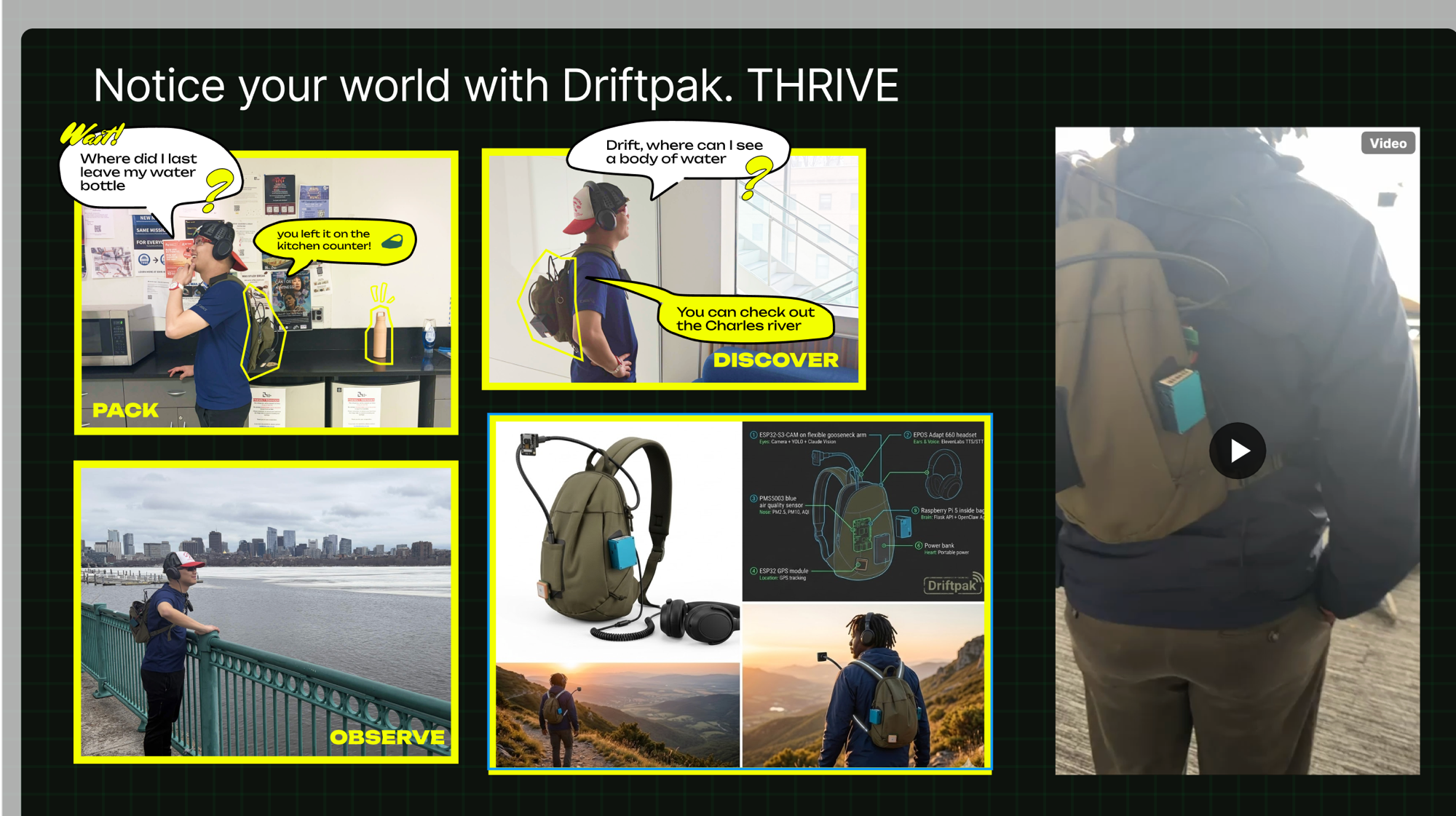
Three things a trail-companion bag should do:
PACK — look inside itself via camera, cross-reference the weather and planned route, and alert you if you’ve forgotten something. The demo scenario on our slide was literal: “Where did I last leave my water bottle?” → “You left it on the kitchen counter!”
DISCOVER — answer questions about your surroundings in real time. “Drift, where can I see a body of water?” → “You can check out the Charles River.”
OBSERVE — monitor air quality, temperature, and humidity throughout the adventure; surface useful environmental data without pulling you out of presence.
The bag wouldn’t just be a gadget. It would have a personality. We wrote out the agent identity explicitly before writing a line of code:
Warm, encouraging, slightly protective, curious about the world. Think Dora the Explorer’s Backpack meets a park ranger meets a mindfulness coach.
The Architecture
The system has three layers.
Telegram / Voice
        ↕
  OpenClaw Agent (Pi :18789)
        ↕  HTTP
  Flask API Server (Pi :5000)
        ↕  proxy
  ESP32 Devices (192.168.137.x)
  ├── ESP32-S3-CAM (.140)  — camera + LED strip
  ├── ESP32 WROOM-32 (.28) — Neo-6M GPS
  └── ESP32 + PMS5003 (.115) — air quality (PM2.5/PM10/AQI)
  + EPOS Adapt 660 (USB-C)  — microphone + speaker
Flask acts as the “nervous system” — 18 REST endpoints that abstract the hardware completely. The agent doesn’t talk to ESP32s directly; it makes HTTP calls to localhost:5000. This meant the AI layer and the hardware layer could be developed and debugged independently. When something broke, you knew which layer to blame.
OpenClaw is an open-source local AI agent framework that runs on the Pi and connects to a language model of your choice. We configured it with 16 curl-based tools that wrap the Flask endpoints — take_photo, say, listen, get_gps, led_on, check_devices, and so on. OpenClaw handles the reasoning loop; the tools give it hands.
The ESP32 auto-discovery protocol was one of Leon’s elegant ideas: any ESP32 that serves a /docs endpoint in a specific JSON format gets automatically registered, proxy routes are created for all its endpoints, and the agent immediately gains access. Plug in a new sensor; it integrates itself.
Vision: Two Tiers
The bag’s eyes use a tiered approach we’re particularly happy with.
Tier 1 — YOLO runs locally on the Pi using YOLOv8 nano (~6MB). It’s fast (~50ms), offline, and handles the 80 standard COCO classes — person, backpack, bottle, phone, dog. Fine for quick detection.
Tier 2 — Claude Vision kicks in when you need more. It receives the same image, gets YOLO’s results as context, and can identify anything YOLO can’t: brands on labels, handwritten text, trail markers, specific plant species, obscure gear.
# vision_manager.py — the key pattern
yolo_result = self.detect(image_bytes)       # fast, offline
# pass YOLO findings as context to Claude
claude_response = self.claude.messages.create(
    model="claude-sonnet-4-20250514",
    messages=[{
        "role": "user",
        "content": [
            {"type": "image", "source": {"type": "base64", "data": img_b64}},
            {"type": "text", "text": f"What do you see? YOLO detected: {yolo_summary}"}
        ]
    }]
)
The two tiers are complementary rather than redundant. YOLO answers “what’s here, fast.” Claude answers “what does it mean.”
The Build: What Actually Happened
We started at zero. The Pi was a fresh board with no OS.
The first two hours were OS setup and networking. MIT’s enterprise WiFi (WPA2 Enterprise) can’t be pre-configured in the Pi Imager — you have to connect manually on first boot. Once we were on MIT SECURE, the next hurdle was that the ESP32s expected to live on 192.168.137.x (Leon’s laptop hotspot subnet) while the Pi was on 10.31.x.x. The solution: make the Pi broadcast its own WiFi hotspot for the ESP32s while staying connected to MIT SECURE for internet — concurrent AP+STA mode on the Pi’s onboard WiFi chip.
OpenClaw install had its own character. The npm global bin path wasn’t in the Pi’s PATH out of the box, which caused the systemd service registration to fail in a confusing way. Once we traced it and added ~/.npm-global/bin to .bashrc, the gateway came up clean.
The most load-bearing moment of the hack was discovering and fixing a one-line Windows-only bug in the audio code:
# what it was (developed on Windows)
os.system(f'start /min "" "{tmp_path}"')

# what it needed to be on Pi Linux
os.system(f'mpg123 -q "{tmp_path}" &')
One line. Everything else was correct. ElevenLabs TTS was already wired; the audio just needed to actually come out of the speaker.
By hour 18, all three ESP32s were online, the Flask server was running 18 endpoints behind a live dashboard accessible over Tailscale, and the OpenClaw agent was responding to messages in our Telegram group.
What We Shipped
| Component | Status at Demo |
|---|---|
| Flask API server (18 endpoints) | ✅ Running, systemd autostart |
| OpenClaw agent (16 tools) | ✅ Telegram active |
| Live monitoring dashboard | ✅ Accessible via Tailscale |
| ESP32 camera | ✅ Online |
| ESP32 GPS | ✅ Online (no satellite fix indoors) |
| Air quality sensor | ✅ Online |
| ElevenLabs TTS (Sarah voice) | ✅ Working |
| YOLOv8 object detection | ✅ Running on Pi |
| Claude Vision identification | ✅ Integrated |
| Continuous audio transcription | ✅ Rolling 50-transcript buffer |
The bag survived a power bank swap mid-demo because we’d set up systemd user services with lingering — both Flask and OpenClaw restart automatically on boot without anyone logged in.
The Design Decisions Worth Keeping
Flask as middleware is the right abstraction for hardware + AI. The agent doesn’t need to know how to talk I2C or parse NMEA sentences. It needs GET /gps to return {"lat": 42.36, "lng": -71.09}. The middleware handles everything in between, and the agent can be swapped out independently of the hardware layer.
Auto-discovery through /docs contracts beats hardcoding. Any ESP32 that serves a structured /docs endpoint gets integrated without touching the Flask server. We added the air quality sensor mid-hack in under 10 minutes.
ControlMaster for SSH saves sanity when scripting. A script that makes three SSH connections (mkdir, scp, resolve path) normally means three password prompts. SSH ControlMaster socket reuse brings it down to one. Small thing; large quality-of-life improvement over 24 hours.
YOLOv8 nano + Claude Vision is a better duo than either alone. YOLO is fast but limited to 80 COCO classes; Claude is comprehensive but costs a round trip. Run YOLO first and pass its findings to Claude as context — Claude’s response is more grounded, and you’re not asking it to describe the whole image cold.
Takeaways
The agent identity doc matters more than you think. Writing out who the bag is — its voice, its three missions, its personality — before writing a line of code gave the whole project a coherence it wouldn’t otherwise have. When we were making design calls at hour 14, we kept asking “what would Driftpak do?” and getting useful answers.
The middleware pattern scales. One Flask server → one agent. Add a new sensor, add one line to the auto-discovery registry. The agent’s tool list grows automatically. This pattern generalizes to any hardware-AI integration where you want to swap out the reasoning layer without rewiring the hardware.
Hackathon software is 80% plumbing. The “AI” parts — the vision pipeline, the agent, the voice — took maybe four hours total. The rest was OS setup, networking, systemd, PATH issues, a Windows bug, SSH keys. If you want to ship hardware+AI in 24 hours, get the plumbing done first.
Personal touch compounds. “Dora the Explorer’s Backpack meets a park ranger meets a mindfulness coach” is a sillier brief than most people would write. It’s also the reason the agent has a consistent personality and why the project was fun to build. The best hackathon projects have a soul.
Code: github.com/leonkoech/hackbag
Built at HardMode 2026, MIT Media Lab — Team #34 Driftpak: Danlin Huang, Leon Kipkoech, Jordan Louie, Yuejia Luo, Quilee Simeon, Carver Wilcox.